

Are HighLevel WordPress sites fast and reliable? On infrastructure, yes. HighLevel hosts WordPress on Linux VPS servers behind Cloudflare's Enterprise CDN, with unlimited PHP workers, daily backups kept for 30 days, staging, and a 99.99% uptime guarantee. Real speed still depends on the site you build, and 91 blocked plugins change some agency workflows.
Most agencies asking this already pay for HighLevel and want to know whether client WordPress sites can live there too, on one bill and one dashboard.
HighLevel's marketing page does not settle it. It promises "lightning-fast load times" but publishes no speed numbers. So I went through HighLevel's own help center instead, where the specs, limits, and blocked plugins are actually listed. Everything below comes from those pages as of September 2026, with each source linked.
What does HighLevel WordPress hosting run on?
HighLevel WordPress hosting runs on Linux VPS servers with Cloudflare Enterprise CDN in front, PHP 5.6 through 8.4, MySQL 8, and unlimited PHP workers. This is the full picture from HighLevel's hosting specs page, last updated July 2026:
Two lines in that table matter more than they look. Unlimited PHP workers means a traffic spike or a slow admin task does not queue behind a fixed worker count, a limit many managed WordPress hosts set per plan.
No email sending means the emails WordPress sends itself, including contact form notifications and password resets, need an SMTP service before you can trust them. That one catches agencies out after a migration.
Are HighLevel WordPress sites fast?
The hosting layer is fast. Cloudflare Enterprise serves cached pages and static files from locations close to each visitor, and you choose which of eight regions runs the origin server. What HighLevel cannot fix is a heavy build: a page builder with a stack of add-ons and uncompressed hero images will be slow on any host.
Pick the region closest to your visitors
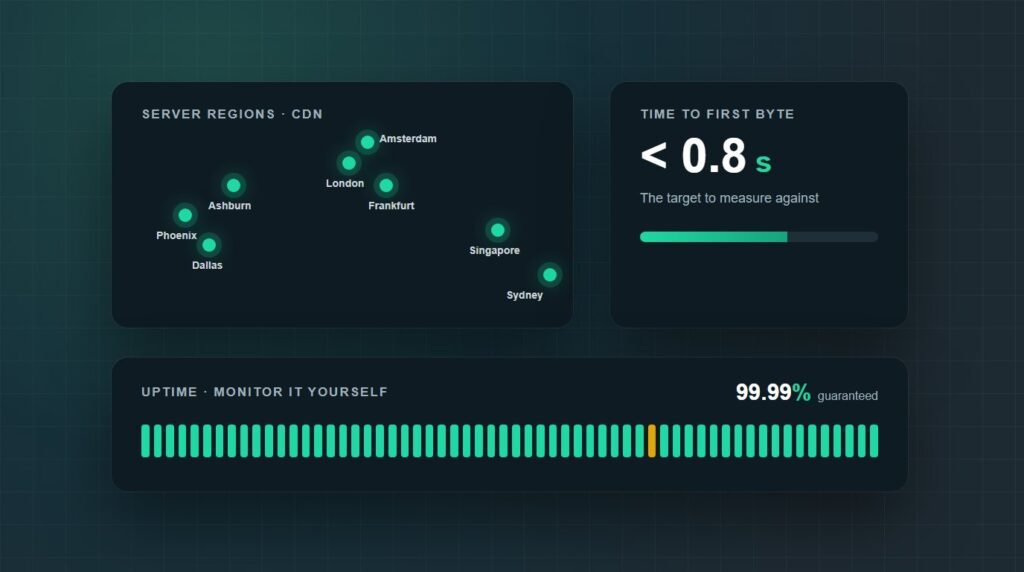
HighLevel offers eight data center locations: Ashburn, Phoenix, and Dallas in the US, then London, Frankfurt, Amsterdam, Sydney, and Singapore. For US clients, Ashburn sits closest to the East Coast, Dallas to the middle of the country, and Phoenix to the West.
Choose carefully, because the region is locked once the site is created. HighLevel calls the setting immutable, so a Texas business placed on a Frankfurt server stays there unless you rebuild the site.
Caching works differently here
HighLevel blocks the usual page caching plugins, including LiteSpeed Cache, W3 Total Cache, WP Super Cache, Cache Enabler, and SiteGround's optimizer. Its help center says restricted plugins either replicate built-in features or are not suited to the environment, so the platform and Cloudflare handle that layer.
WP Rocket is not on the blocked list. I would still test it on staging before relying on it, because it overlaps with caching the platform already does, and two caching layers fighting each other is a common cause of stale or broken pages.
The build decides the rest
Once the server is quick, speed comes down to what you put on it: the theme, the builder, the number of plugins, and image weight. Our guide to fixing a slow WordPress website covers the order to work in, and image optimization is usually the fastest win.
Elementor sites deserve a separate look, since add-ons tend to cost more than Elementor itself. Here is how to speed up an Elementor website without rebuilding it.
Are HighLevel WordPress sites reliable?
The safety net is good: daily backups kept for 30 days, one-click restores, a staging copy, per-plugin automatic updates, and a 99.99% uptime guarantee. What is missing is public proof. HighLevel's status page lists WordPress, but as a resource that is not monitored (as of September 2026), so there is no public uptime history to check.
Backups: daily, kept up to 30 days, restorable in one click, with manual backups before risky changes.
Staging: test plugin and theme updates on a copy before they touch the live site. Here is how a WordPress staging site works if you have not used one.
Automatic updates: set core to minor or latest versions, and switch auto updates on or off for each plugin and theme.
Uptime Monitor: a dashboard with availability, minimum, average, and peak response times, and a feed of downtime events.
SSH and WP-CLI: command-line access for bulk changes and troubleshooting, which many all-in-one platforms do not give you.
What does 99.99% uptime actually allow?
About 4.4 minutes of downtime a month. The specs page states the guarantee but not what happens when it is missed, such as service credits, so ask support before you promise the same number to a client.
Keep one backup outside HighLevel
Backup plugins such as UpdraftPlus, BackWPup, and Duplicator are blocked, so HighLevel's backups become your only backups by default. I would keep a periodic copy elsewhere: an SFTP download of wp-content plus a database export through WP-CLI over SSH. If a site does go down, our emergency website downtime checklist covers the first hour.
What are the tradeoffs of HighLevel WordPress hosting?
Six things are worth checking before you migrate a client, because they change how you build and maintain the site rather than how fast it loads.
91 blocked plugins
The restricted plugin list goes beyond caching and backups. It also blocks Broken Link Checker, WordPress Popular Posts, and several related-posts plugins. Compare every active plugin on the client site against it before migrating.
No built-in email
Install an SMTP plugin connected to a transactional email service, then send a test through every form on the site. A form that quietly stops emailing loses leads without anyone noticing.
A region you cannot change
The server location is fixed at setup. Moving a site to a different region later means creating a new site in that region and migrating into it.
Cloudflare proxy conflicts
If the client's DNS is on Cloudflare, HighLevel asks you to turn the proxy off for the site's records. Any Cloudflare rules the client had on that hostname stop applying.
No plugin downgrades from the dashboard
HighLevel can update plugins and themes but cannot roll them back from its dashboard. When an update breaks something, the fix is a backup restore or a manual reinstall of the older version.
Cost on top of your HighLevel plan
Hosting is an add-on to the HighLevel subscription, not included in it. The plans below are HighLevel's published prices as of September 2026.
HighLevel's own example: the $97 Starter plan plus Standard hosting comes to $107 a month for one WordPress site. At 25 sites, the Utility plan works out to $8.80 per site each month.
How to test your own HighLevel WordPress site
Run three checks rather than trusting anyone's speed claims, including this article's. They take about fifteen minutes and give you numbers you can show a client.
Run the built-in Performance Report
In HighLevel, go to Sites, WordPress, Manage Website, Analytics, Performance Reports, and click Fetch Report. You get PageSpeed scores and Core Web Vitals (LCP, INP, and CLS) for mobile and desktop. Our guide to Core Web Vitals in WordPress explains what to fix first.
Measure time to first byte
Time to first byte (TTFB) shows how quickly the server starts answering. Run this a few times from a terminal; the first request may miss the cache, so look at the later ones. Google's guidance on TTFB treats 0.8 seconds or less as good.
Watch uptime from outside HighLevel
Switch on HighLevel's Uptime Monitor, then add an external monitor as well, so you are not relying only on the host checking itself. A month of independent data answers the reliability question better than any spec sheet.
When does HighLevel WordPress hosting make sense?
HighLevel hosting makes the most sense for agencies already running clients on HighLevel who build lead generation sites on a light theme. It makes the least sense for sites that depend on blocked plugins, or for stores whose cart and checkout pages cannot be served from a CDN cache.
For a lead generation site built on a light theme, I would be comfortable hosting on HighLevel. For a store or a site with a long plugin list, I would set it up on staging first and keep the current host until the Performance Report and TTFB numbers match or beat it.
Key takeaways
Are HighLevel WordPress sites fast and reliable? The infrastructure is: Cloudflare Enterprise in front, eight regions, unlimited PHP workers, daily backups kept for 30 days, and staging. Real speed still comes from the build, so a heavy theme stays heavy.
The limits are practical rather than technical. Ninety-one plugins are blocked, including the popular caching and backup ones, WordPress email needs SMTP, and the server region is fixed once the site exists.
Before moving client sites, check their plugins against the blocked list, pick the region deliberately, set up SMTP, and measure TTFB and uptime yourself for a month.
Frequently asked questions
Is HighLevel WordPress hosting good?
For lead generation and brochure sites, yes. HighLevel runs WordPress on Linux VPS servers behind Cloudflare Enterprise CDN, with unlimited PHP workers, daily backups kept for 30 days, and staging. The main drawbacks are 91 blocked plugins, no built-in email sending, and a server region that cannot be changed after setup.
What CDN does HighLevel WordPress hosting use?
HighLevel WordPress hosting uses Cloudflare Enterprise CDN on every plan, which also provides the free SSL certificate. If your domain's DNS is already on Cloudflare, HighLevel asks you to turn the Cloudflare proxy off for the site's records so its own Cloudflare setup can serve the site.
How much does HighLevel WordPress hosting cost?
As of September 2026, WordPress hosting is an add-on to a HighLevel subscription. Standard costs $10 a month for one site, Utility $220 a month for 25 sites, and Unlimited $497 a month for unlimited sites. Annual billing lowers these to $9, $208, and $414 a month.
Can I use caching plugins on HighLevel WordPress hosting?
Most of them are blocked, including LiteSpeed Cache, W3 Total Cache, WP Super Cache, and Cache Enabler, because HighLevel handles caching at the platform and CDN level. WP Rocket is not on the blocked list, but test it on a staging copy first to avoid two caching layers conflicting.
Does HighLevel back up WordPress sites?
Yes. HighLevel takes daily backups, keeps them for up to 30 days, and restores them in one click, with manual backups available too. Popular backup plugins such as UpdraftPlus and Duplicator are blocked, so keep an extra copy outside HighLevel using SFTP and a WP-CLI database export.
Where are HighLevel WordPress servers located?
HighLevel offers eight server locations: Ashburn, Phoenix, and Dallas in the US, plus London, Frankfurt, Amsterdam, Sydney, and Singapore. You choose one when creating the site, and the choice is locked afterwards, so pick the region closest to most of the site's visitors.
Want a second opinion before moving client sites?
Survyc is an AI-first digital agency. We test client sites on staging, fix what slows them down, and check that forms and email still work, wherever the site is hosted. Our WordPress speed optimization work starts with the numbers, not guesses.
For agencies, we deliver the same work white label, so your HighLevel WordPress sites stay under your brand. Send us a URL, or email info@survyc.com.
Talk to usLast reviewed: September 2026. Specs, prices, and the blocked plugin list come from the HighLevel help center and change often, so this guide is reviewed every quarter.
