

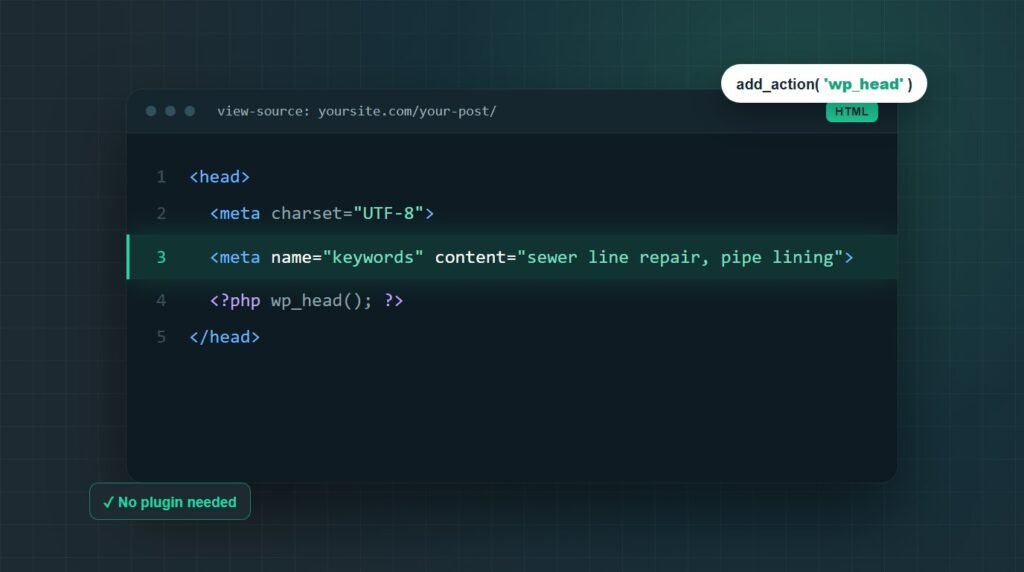
To add meta keywords in WordPress without a plugin, paste a short PHP function into your child theme's functions.php, or a must-use plugin file, that hooks into wp_head and prints a meta keywords tag. The keywords can come from a custom field on each post, from the post's tags, or from a fixed list for the homepage.
No client has ever asked me to add meta keywords to their site. The request comes from people learning SEO, usually after an older tutorial told them every page needs a keywords tag.
The code takes about five minutes. Below are four ways to add it, which one suits your theme, how to check it worked, and what the tag actually does for you in 2026.
Using a block theme with no header.php? Methods 1 to 3 still work. See the block theme notes.
Method 1: Add meta keywords to each post with a custom field
A custom field is the most flexible way to add meta keywords in WordPress without a plugin. You type the keywords into a field on each post, and a small function prints them in the page head. Posts without the field get no tag at all.
Step 1: Add the function to your child theme
Open your child theme's functions.php over SFTP or your host's file manager, and paste this at the end of the file:
function mysite_meta_keywords() {
if ( ! is_singular() ) {
return;
}
$keywords = get_post_meta( get_queried_object_id(), 'meta_keywords', true );
if ( empty( $keywords ) ) {
return;
}
$terms = array_filter( array_map( 'trim', explode( ',', $keywords ) ) );
printf( '<meta name="keywords" content="%s">' . "\n", esc_attr( implode( ', ', $terms ) ) );
}
add_action( 'wp_head', 'mysite_meta_keywords', 1 );
Three details in that code matter. is_singular() limits the tag to single posts, pages, and custom post types, so archives and search results stay clean. esc_attr() escapes the value, so a stray quote in the field cannot break your HTML or inject a script. The priority of 1 places the tag near the top of the head.
Use a child theme, not the parent theme. A theme update replaces the parent's functions.php, and your code disappears with it. No child theme yet? The must-use plugin file in the block themes section below works with any theme.
One missing semicolon in functions.php stops the whole site from loading. Take a backup first (our WordPress backup guide covers how) and keep SFTP open, so you can delete the code if the screen goes white.
I paste code over SFTP rather than in Appearance, Theme File Editor. WordPress checks edits made there for fatal errors, but many hosts switch the editor off, and SFTP still works when the admin will not load. If a site does go blank, our guide to the WordPress white screen of death walks through the recovery.
Step 2: Turn on the Custom Fields panel
The block editor hides custom fields by default. Open a post, click the three-dot menu at the top right, choose Preferences, and switch on Custom fields under Advanced. Then click Show & reload page.
In the Classic Editor, tick Custom Fields under Screen Options instead. If the toggle is missing, Advanced Custom Fields (ACF) is probably hiding the panel. In that case, create an ACF text field named meta_keywords, and the same code reads it.
Step 3: Add your keywords to the meta_keywords field
Scroll below the content to the Custom Fields panel. Click Enter new, type meta_keywords as the name, and add your keywords as a comma-separated list. Click Add Custom Field, then update the post.
Do not start the name with an underscore. WordPress treats keys like _meta_keywords as private and hides them from this panel.
Keep the list short and specific to the page:
Three to five terms that describe this page and nothing else. A long list of variations is exactly the pattern Bing has said it can read as a spam signal.
Method 2: Use post tags as meta keywords automatically
If you already tag your posts, you can turn those tags into keywords without typing anything new. This function reads the tags on each post and prints the first ten as the keyword list:
function mysite_meta_keywords_from_tags() {
if ( ! is_single() ) {
return;
}
$tags = get_the_tags( get_queried_object_id() );
if ( empty( $tags ) || is_wp_error( $tags ) ) {
return;
}
$names = array_slice( wp_list_pluck( $tags, 'name' ), 0, 10 );
printf( '<meta name="keywords" content="%s">' . "\n", esc_attr( implode( ', ', $names ) ) );
}
add_action( 'wp_head', 'mysite_meta_keywords_from_tags', 1 );
The tradeoff is quality. Tags are usually written for navigation, so they tend to be broad ("WordPress", "Tips") rather than specific to one post. Clean them up before you rely on them.
Use Method 1 or Method 2, not both. Each one prints its own tag, so running both puts two keywords tags on every post.
Method 3: Add site-wide keywords to the homepage
For one keyword list on the homepage, check is_front_page() and print a fixed string:
function mysite_home_meta_keywords() {
if ( ! is_front_page() ) {
return;
}
$keywords = 'sewer line repair, trenchless pipe lining, Austin';
printf( '<meta name="keywords" content="%s">' . "\n", esc_attr( $keywords ) );
}
add_action( 'wp_head', 'mysite_home_meta_keywords', 1 );
Use is_front_page(), not is_home(). When your homepage is a static page and your posts live on /blog/, is_home() is true on the blog page, so the tag lands on the wrong URL.
Method 3 can run alongside Method 1, as long as the homepage itself has no meta_keywords field. Otherwise the front page prints two tags.
Method 4: Hard-code the tag in header.php
Classic themes build the page head in header.php, so you can type the tag straight into the file. Copy header.php from the parent theme into your child theme, open the copy, and paste this line just above <?php wp_head(); ?>:
Most tutorials show this method, and it is the weakest of the four. Every page gets the same keywords, including blog posts and category archives that have nothing to do with them. It only makes sense for a one-page site.
What if your theme has no header.php?
Block themes such as Twenty Twenty-Four and Twenty Twenty-Five have no header.php. Their templates are HTML files edited in the Site Editor, and the Site Editor cannot add tags to the page head. The wp_head hook still runs, though, so Methods 1 to 3 work unchanged.
If you do not want a child theme for one function, use a must-use plugin. It is not a plugin you install. It is a single PHP file you create yourself, and WordPress loads it automatically on every request.
Connect over SFTP and open the wp-content folder.
Create a folder called mu-plugins if it does not exist yet.
Create meta-keywords.php inside it and paste the code below.
function mysite_meta_keywords() {
if ( ! is_singular() ) {
return;
}
$keywords = get_post_meta( get_queried_object_id(), 'meta_keywords', true );
if ( empty( $keywords ) ) {
return;
}
$terms = array_filter( array_map( 'trim', explode( ',', $keywords ) ) );
printf( '<meta name="keywords" content="%s">' . "\n", esc_attr( implode( ', ', $terms ) ) );
}
add_action( 'wp_head', 'mysite_meta_keywords', 1 );
Must-use plugins survive theme switches and cannot be deactivated from the admin by accident. They still appear under Plugins, Must-Use, so the next developer on the site can find the code.
How to check the meta keywords tag is working
Open the post in a private window, press Ctrl+U (Cmd+Option+U on a Mac) to view the source, and search for name="keywords". You should find exactly one tag, with your keywords inside it.
Clear your cache first if you use a caching plugin or Cloudflare. Otherwise you are reading the HTML from before your change.
From a terminal, one command runs the same check:
View-source is also the quickest way to review your other head tags (title, description, canonical, robots) as part of a WordPress site audit.
Meta keywords not showing? Five things to check
When the tag is missing, the cause is almost always one of these five. Work through them in order, because the first two cover most cases.
Is a cache serving the old page?
LiteSpeed Cache, WP Rocket, your host, and Cloudflare can all keep serving HTML from before you added the code. Purge every layer, then view the source again in a private window.
Does your theme call wp_head()?
Every snippet here relies on the wp_head hook. Some old or hand-built themes never call wp_head() in their head, and then nothing can print there. Search the theme files for wp_head(); if it is missing, use Method 4.
Is the condition matching the page?
is_single() is false on pages, so Method 2 skips them. is_home() means the blog index, not always the homepage. For posts and pages together, use is_singular().
Does the field name match exactly?
meta_keywords, meta-keywords, and Meta_Keywords are three different keys to WordPress. The name in the Custom Fields panel has to match the name in the code, character for character.
Is something else printing a second tag?
Rank Math prints a keywords tag once the rank_math/frontend/show_keywords filter is on, and All in One SEO has a Use Meta Keywords setting under Search Appearance, Advanced. Keep one source for the tag and remove the other.
Do meta keywords still matter in 2026?
For Google, no. Google's own documentation says the keywords tag "is not used by Google Search, and it has no effect on indexing and ranking at all." Adding it will not move a single ranking on Google.
That has been true since at least 2009, when Matt Cutts confirmed Google ignored the tag because site owners had stuffed it with unrelated terms. John Mueller repeated the same answer in 2023.
The SEO plugins reached the same conclusion. Yoast removed its keywords box in version 6.3 in February 2018, and Rank Math leaves the tag off unless you switch it on with a filter.
So add the tag if your audience uses Yandex, or if your own site search reads it. Otherwise it has one side effect worth knowing: anyone can open your page source and read the exact keyword list you are targeting.
If you are learning SEO, spend the time on what Google does read: a clear title tag and meta description, headings that match the question, internal links, and making your business easy to identify as an entity. Our guide to entity SEO covers that last part, and if a page is missing from Google altogether, page indexing issues are a far more likely cause than any meta tag.
Key takeaways
Adding meta keywords in WordPress without a plugin takes one function hooked to wp_head. A custom field gives you per-post control, post tags automate it, and is_front_page() handles the homepage. Editing header.php only suits classic themes and one-page sites.
Put the code in a child theme or a must-use plugin, escape the output with esc_attr(), and check in view-source that exactly one keywords tag appears on the page.
Then spend your next hour on what Google reads: titles, meta descriptions, headings, internal links, and entity clarity. The keywords tag can help with Yandex and site search, not with Google.
Frequently asked questions
Does Google use meta keywords?
No. Google's Search documentation states that the keywords tag is not used by Google Search and has no effect on indexing or ranking. Google stopped using it before 2009 because site owners stuffed it with unrelated terms. Adding the tag will not hurt a WordPress site on Google, and it will not help either.
How many meta keywords should I add to a WordPress post?
Three to five specific phrases that describe that one post. Search engines that still read the tag look for relevance, and Bing has said an overstuffed keywords tag can be read as a spam signal. A short list of exact topics works better than twenty variations of the same word.
Can I add meta keywords without editing functions.php?
Yes. Create a must-use plugin instead: a PHP file placed in wp-content/mu-plugins that WordPress loads automatically. It works on classic and block themes, survives theme changes, and cannot be switched off from the admin by accident. Classic themes also allow a hard-coded tag in a child theme's header.php.
Why can't I find header.php in my WordPress theme?
Your site probably runs a block theme, such as Twenty Twenty-Four or Twenty Twenty-Five. Block themes build pages from HTML templates edited in the Site Editor, so there is no header.php to edit. Add the tag with a function hooked to wp_head in a child theme or must-use plugin instead.
Do Yoast or Rank Math add meta keywords?
Not by default. Yoast removed its keywords feature in version 6.3 in February 2018. Rank Math leaves the tag off but prints it once you add the rank_math/frontend/show_keywords filter. All in One SEO has a Use Meta Keywords setting under Search Appearance, Advanced. Keep only one source for the tag.
Will meta keywords slow down my WordPress site?
No. The tag is one short line in the page head, and the function behind it reads a value WordPress has usually loaded already. Slow pages come from large images, heavy themes, and too many scripts, which is where real speed optimization starts, not from a keywords tag.
Rather not touch the code yourself?
Survyc is an AI-first digital agency. We can add meta keywords in WordPress without a plugin for you, in a child theme or must-use plugin, tested on staging first. Our WordPress customization work covers changes like this one.
If the real goal is ranking on Google, our WordPress SEO service works on the titles, content, and structure search engines read. Tell us what you need, or email info@survyc.com.
Talk to usLast reviewed: September 2026. Code tested on PHP 8.3. WordPress and SEO plugin menus change between versions, so this guide is reviewed every quarter.
