

Last Updated July 31, 2026
WordPress is a good choice for most small businesses that plan to publish content, rank on Google, or grow beyond a simple brochure site. It gives you ownership and flexibility no hosted builder matches. It is the wrong choice if nobody will maintain it, because an unmaintained WordPress site becomes a security and speed problem within a year.
Almost every article answering this question was written by someone who sells WordPress. That includes people like me, which is exactly why this guide leads with the drawbacks and includes the situations where I would tell a business owner to pick something else. You are trying to make a decision worth thousands of dollars and several years of your time. You deserve the case against, not just the sales pitch.
First, know which WordPress people mean
Two different products share the name, and confusing them causes most of the bad advice you will read. WordPress.org is free open-source software you install on hosting you buy yourself. You own everything, you can install any plugin, and you are responsible for updates and security. WordPress.com is a hosted service run by a company, closer to Wix or Squarespace, where lower plans restrict plugins and customization.
Every statistic about WordPress powering a huge share of the web, and everything in this guide, refers to WordPress.org, the self-hosted version. When someone says “WordPress is free,” they mean the software is free. The website is not.
Is WordPress still relevant in 2026?
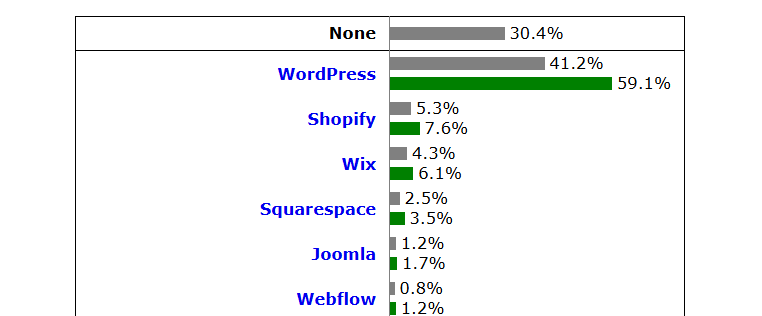
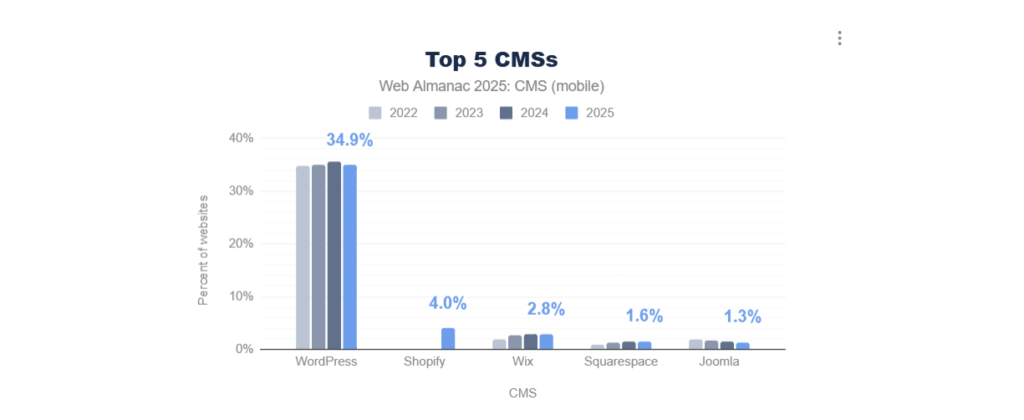
Yes, and by a wide margin. W3Techs data as of 2026 puts WordPress at roughly 42% to 43% of all websites, and around 60% of sites using a known content management system. Its closest competitor, Shopify, sits near 6%. That share has held steady for years while newer platforms came and went.
Market share alone does not prove a platform is right for you, but it does settle two practical worries. You will not struggle to find someone who can work on your site, and the ecosystem around it is not going anywhere.
It also explains the depth of the plugin library: more than 60,000 free plugins exist because that many developers build for the platform. Large organizations run on it too, including NASA, TechCrunch, Time and Harvard, which is a reasonable answer to anyone who tells you WordPress is only for blogs.
The honest case for WordPress
Four advantages matter to a small business, and they are real rather than marketing lines.
You own it. Your site, content, database and hosting account belong to you. You can move hosts, hire a different developer, or export everything. On a hosted builder, you rent access, and the platform’s rules and pricing are the platform’s to change.
It grows with you. The site that starts as five service pages can add a booking system, a members area, a store or a multilingual version later without a rebuild. Businesses outgrow simple builders far more often than they outgrow WordPress.
SEO control is deeper. Every builder can handle basic SEO in 2026, and for a local plumber any of them will do. The difference shows up when you have a real content strategy: control over URL structure, redirects, schema, canonicals, indexing rules and page structure. If organic search is going to be a main channel, that control compounds.
No revenue share, and cheaper at scale. WooCommerce takes no cut of your sales. Hosted platforms charge monthly, and business features that come free in the WordPress ecosystem often sit behind higher tiers. Agencies commonly see clients move to WordPress once their builder bill grows past a couple of hundred dollars a month.
The honest case against WordPress
Now the part most WordPress articles skip. These are real, and you should weigh them before deciding.
Somebody has to maintain it
Core, theme and plugin updates, backups and security are your responsibility. Practitioner data reported across the industry suggests sites left without active maintenance tend to get compromised inside a year, and this matches what shows up in cleanup work. WordPress is not insecure by design; it is unmaintained WordPress that gets hit. If nobody will own that job, either budget for someone or choose a hosted platform.
Performance is not automatic
This is the statistic WordPress-friendly guides quietly leave out: analysis of platform performance in 2026 shows WordPress sites passing Core Web Vitals at roughly 43% to 45%, while Wix passes around 71% to 75% and Duda around 85%.
That is not because WordPress cannot be fast; a well-built WordPress site beats most builders. It is because the average WordPress site carries a heavy theme, too many plugins and cheap hosting, while a hosted builder controls the whole stack. On WordPress, speed is something you get right on purpose, not something the platform hands you.
The learning curve is real
For a beginner building a professional-looking site alone, plan for something like 40 to 80 hours to learn the system and produce the result, according to build guides. On a hosted builder you can be live in a weekend. If your time is worth more spent on customers than on learning a CMS, that difference matters.
Plugin conflicts happen
Flexibility comes from thousands of independent developers, which is also why two plugins occasionally fight, or an update breaks a layout. This is manageable with staging and discipline, and annoying without it.
What does a WordPress site actually cost a small business?
Costs split into the build and the running. Both get underestimated, usually because people budget the build and forget the rest.
| Item | Typical 2026 range | Notes |
|---|---|---|
| Domain | $10 to $20 per year | Often free for year one with hosting |
| Shared hosting | $5 to $15 per month | Fine to start, limits show under traffic |
| Managed WordPress hosting | $30 to $100 per month | Worth it once the site earns money |
| Premium theme | $50 to $200 one-off | Free themes are viable |
| Plugins | $200 to $800 per year | Typical business stack; ecommerce runs higher |
| DIY build | Under $1,000 total | Plus your 40 to 80 hours |
| Freelancer build | $1,200 to $5,000 | Custom design and functionality |
| Agency build | $3,000 to $12,000 | Larger scope, more process |
| Ongoing maintenance | $50 to $200+ per month | Updates, backups, security, support |
Blending those, a realistic small business picture in 2026 looks like this: a DIY site running $100 to $500 per year plus your time, a professionally built site costing $1,200 to $8,000 upfront with $800 to $2,000 per year ongoing. Figures vary by region and scope, so treat these as calibration ranges rather than quotes.
Two honest notes. The genuinely biggest hidden cost is not a plugin licence, it is content: writing your pages and getting decent photos takes longer and costs more than owners expect on any platform. And first-year hosting discounts hide renewal pricing, so budget from renewal rates, not the promotional ones.
WordPress vs Wix vs Squarespace vs Shopify
The comparison that actually helps is about fit, not about which platform is objectively best.
| WordPress | Wix | Squarespace | Shopify | |
|---|---|---|---|---|
| Typical cost | $5 to $100/mo hosting, plus build and upkeep | $17 to $45/mo business tiers | $23 to $72/mo business tiers | Monthly plan plus transaction fees |
| Setup speed | Slowest | Fastest | Fast | Fast for stores |
| Maintenance | Yours | Handled | Handled | Handled |
| Design ceiling | Unlimited | High with Wix Studio | Beautiful defaults, less flexible | Store-focused |
| SEO ceiling | Highest | Good for standard local SEO | Good, less flexible | Good for products |
| Ownership | Full | Rented | Rented | Rented |
| Best fit | Content, growth, custom needs | Fast simple sites | Visual-first brands | Serious product selling |
The pattern worth remembering: all four can produce a good small business website in 2026, and builders have closed much of the gap for straightforward local sites. The gap reopens as your requirements get specific, your content volume grows, or you need something the platform did not anticipate.
When WordPress is the wrong choice
I would genuinely steer some businesses elsewhere. If you recognise yourself here, a hosted builder is the better answer, and choosing it is not a compromise.
- Nobody will maintain it. No in-house person, no budget for care, no intention to think about it again. An abandoned WordPress site is worse than a simple builder site that quietly keeps working.
- You need a site this week and it is a brochure. Five pages, contact details, no content plans. A builder does that in a weekend, well.
- Your business will never publish content. If organic search is not part of the plan, WordPress’s biggest advantage does not apply to you.
- You are selling products and want the simplest path. Shopify handles the store-specific work (payments, tax, shipping, fraud) as its core job. WooCommerce is more flexible and cheaper at scale, but only if someone is managing it.
- You are visual-first with simple needs. Photographers, studios and hospitality brands often get more from Squarespace‘s defaults than from configuring the same look on WordPress.
An honest caveat in the other direction: builders have their own lock-in. Moving a content-heavy site off WordPress is hard, but moving off Wix is also hard, and you cannot take the platform with you. Neither choice is free of consequences, which is why matching it to your situation matters more than the platform argument.
The variable that decides the outcome
Here is what a decade of working on other people’s sites teaches you: the platform matters less than how the site gets built. Most “WordPress is slow” and “WordPress is insecure” complaints are really complaints about a specific site.
A WordPress site with decent hosting, a light theme, a small number of well-chosen plugins, optimized images and a clear structure performs well and stays secure for years. A WordPress site with a bloated multipurpose theme, thirty plugins, unoptimized images and cheap shared hosting is slow, fragile and eventually compromised. Same platform, opposite outcomes. If a theme you bought looks nothing like its preview, our guide on why a WordPress theme does not look like the demo explains the usual reasons.
That cuts both ways, and it is the useful part. On a hosted builder, the platform sets your ceiling and your floor. On WordPress, you set both. If you build it carelessly you will get a worse result than a builder would have given you. If you build it deliberately you will get a better one, and it will keep improving as the business grows.
Five questions that settle the decision
Answer these honestly and the choice usually makes itself.
- Will someone maintain this site? You, a staff member, or someone you pay. If the answer is genuinely nobody, choose a hosted builder.
- Will you publish content regularly? Blog posts, guides, service or location pages. If yes, WordPress’s advantage is significant. If no, it shrinks a lot.
- Do you expect the site to do more in two years than it does today? Bookings, memberships, a store, integrations. More change ahead favours WordPress.
- How much is your own time worth right now? Forty to eighty hours of learning is a real cost. If you are the bottleneck in your business, pay someone or pick something simpler.
- Do you need to own it? If your website is a core business asset you intend to keep and move freely, ownership is worth the maintenance duty. If it is a digital business card, renting is fine.
For most small businesses with growth plans and someone accountable for upkeep, WordPress remains the strongest long-term choice in 2026. For a small brochure site with nobody to look after it, a hosted builder is the better honest answer.
Key takeaways
WordPress is good for small businesses that will publish content, want to own their site, and expect to need more from it over time, which describes most growing businesses. It still runs roughly 42% of the web in 2026, so the ecosystem and talent pool are safe bets.
The real costs are $100 to $500 per year DIY, or $1,200 to $8,000 to build with $800 to $2,000 per year ongoing, and the biggest hidden cost is content. The genuine drawbacks are maintenance duty, a real learning curve, and performance you have to engineer rather than receive, with average WordPress sites passing Core Web Vitals far less often than the best builders.
If nobody will maintain the site, or you need five brochure pages this week, choose a hosted builder instead. And remember that how the site is built decides the outcome more than which platform you picked.
Frequently Asked Questions
Is WordPress good for a small business website?
Yes for most, particularly if you plan to publish content, want to rank on Google, or expect the site to grow. WordPress gives you ownership and flexibility no hosted builder matches. It is a poor fit if nobody will handle updates, backups and security, since unmaintained sites become slow and vulnerable.
Is WordPress free for small business?
The software is free, the website is not. Expect $10 to $20 a year for a domain and $5 to $100 a month for hosting, plus optional themes and plugins. A realistic DIY site runs $100 to $500 per year, while a professionally built site costs more upfront and $800 to $2,000 per year ongoing.
Is WordPress better than Wix for small business?
It depends on your plans. WordPress wins on ownership, flexibility, SEO depth and cost at scale. Wix wins on setup speed, zero maintenance and simplicity. For a fast brochure site with nobody to maintain it, Wix is the practical choice. For content and long-term growth, WordPress is usually better.
Is WordPress hard for beginners?
There is a real learning curve. Beginners building a professional-looking site alone should plan for roughly 40 to 80 hours to learn the platform and finish the build, compared with a weekend on a hosted builder. Day-to-day editing after launch is straightforward; the setup phase is the demanding part.
Is WordPress secure enough for a business website?
Yes, when it is maintained. WordPress core is actively maintained, and most compromises trace back to outdated plugins, weak passwords or neglected sites rather than the platform itself. Keep everything updated, use strong passwords with two-factor authentication, run tested backups, and choose quality hosting.
Do I need a developer for a WordPress website?
Not necessarily. Many owners build and run simple WordPress sites themselves using a page builder. You are more likely to need help for custom features, ecommerce, migrations, recovering a hacked site, or when your time is better spent on the business than on learning the platform.
