

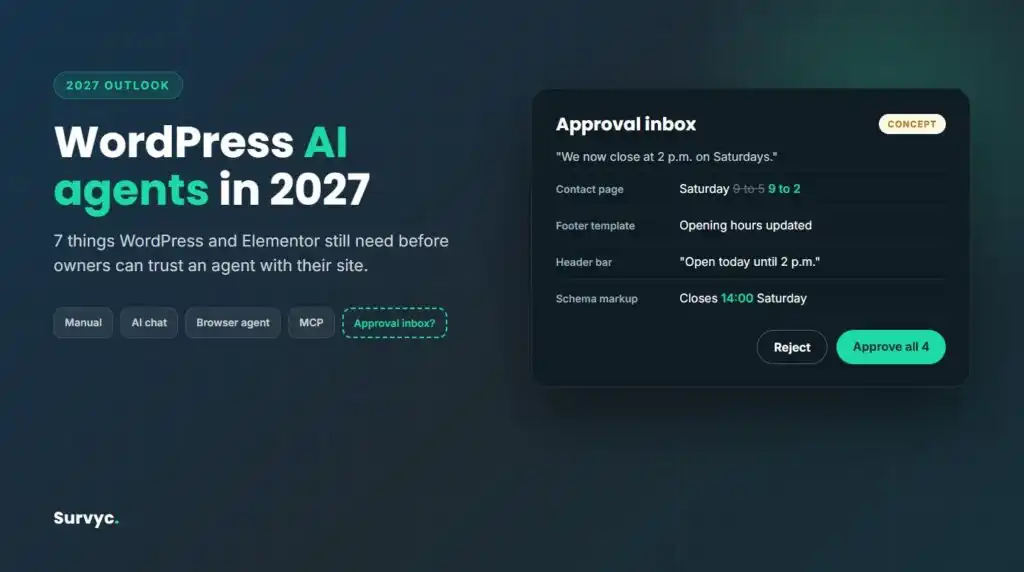
WordPress AI agents can already build pages, edit menus, and check Search Console for you, through Claude, Claude in Chrome, and Elementor's MCP server. What they cannot do yet is work safely without a person watching. Seven missing features stand between today's agent-built sites and a 2027 website the owner never has to log into.
Last week I fixed a homepage where 8 links pointed to Elementor URLs that never existed. An AI agent, working on my instructions, had changed those links the day before. The page export did not even show the bad values. I found them only by searching the live HTML.
That is where WordPress AI agents stand in November 2026: fast, capable, and still in need of a supervisor.
How has WordPress work changed with AI agents?
WordPress AI agents now do work that needed a person in wp-admin two years ago. The change came in four steps, and each one removed a layer of manual clicking.
Manual work. You logged in, found the page, edited the widget, cleared the cache, and checked it on your phone.
AI chat. Claude wrote the code or the copy. You still pasted it in and clicked publish.
Browser agents. Claude in Chrome now clicks through wp-admin and Google Search Console with your own sign-ins, while you watch.
Direct connections. The Model Context Protocol (MCP) lets an agent talk to the site itself, with no browser in between. WordPress core now has an Abilities API, the official MCP Adapter plugin exposes it, and Elementor 4.4 ships its own MCP server plus an Agents module with llms.txt, Markdown versions of pages, and agent discovery files.
Step 4 is how I run survyc.com today. In November 2026 an agent built 36 Texas location pages from one Elementor V4 template. When I decided to close them, it took them offline, redirected every URL, and removed the internal links. New Knowledge answers go live from a script. When a page will not index, I have Claude in Chrome open the URL Inspection tool and read me the result.
If you have not seen the V4 side yet, start with what the Elementor Atomic Editor is. I also wrote up a smaller job, a cookie banner built through Elementor MCP.
What will a WordPress site look like in 2027?
My prediction: the WordPress dashboard becomes an approval inbox. Owners will describe a change in one sentence, an agent will prepare it everywhere it applies, and the owner will approve or reject it. Nobody will hunt for the right widget.
Here is the same task done both ways.
"Change our Saturday hours." Log in, edit the contact page, then the footer template, then the header bar, then remember the schema markup, then clear two caches and check mobile.
"We now close at 2 p.m. on Saturdays." The agent finds the 4 places the hours appear, prepares the edits, and shows you a before and after of each. You tap approve.
The agents can nearly do this already. The platform around them cannot, which is why the next section matters more than any new AI model.
Which 7 features do WordPress and Elementor still need for AI agents?
These are the gaps I hit while letting agents work on a live site. For each one, I checked what WordPress 7.1.4 and Elementor 4.4 already do, so you can see exactly where the line is in November 2026.
1. An agent role with limited permissions
Today an agent signs in with a WordPress application password, and that password carries every permission of the user it belongs to. The auth.md file that Elementor 4.4 generates for agents states it plainly: "There is no separate Elementor role or scope to assign."
capabilities of the WordPress user it belongs to. There is no
separate Elementor role or scope to assign.
apply_filters( 'elementor/agents/oauth/scopes', [] );
// Empty by default: no OAuth scopes are defined yet. Quoted from the plugin files installed on survyc.com. The empty scopes filter is the hook a future permission system would use.
Elementor has prepared for this. Its OAuth discovery files include a scopes list that is empty by default. In 2027 I expect an "Agent" role that can draft pages and edit content, but cannot install plugins, add users, or change settings without approval. Until then, give agents the lowest role that works; my note on WordPress Editor vs Admin roles explains the difference.
2. One review queue with a before and after view
Part of this exists. When an agent edits a published Elementor page through MCP, the change waits as a staged draft until it is published. That protects one page at a time.
Menus and site settings change instantly, though, and nothing gathers the work into one place. I want a single queue: "12 changes on 5 pages, 1 menu, 1 setting," each with a visual before and after, and one approve button.
3. Undo for a whole agent session
WordPress keeps revisions per post, and Elementor keeps history per document. Menus and site settings keep no revision history in WordPress core. A third-party MCP plugin I use adds a per-change rollback, which has saved me more than once, but core has nothing like it.
An agent can change 30 things in 10 minutes. Undo needs to match that: "Revert everything the agent did between 2:00 and 2:40."
4. A change log written for people
Elementor 4.4 has made a real start here. The same auth.md file describes an audit log of every authenticated MCP tool call: time, tool name, agent label, response status, and duration, kept for 30 days.
That log tells you which tool ran. It does not tell you what changed on the page or why. The 2027 version should read like this: "Changed the Dallas page H2 to 'Website Repair in Dallas' because you asked to target website repair searches."
5. Design guardrails for agents
Elementor V4 gives every site global classes and variables for colors, fonts, and spacing. The MCP build tool I use still accepts any inline CSS, so nothing stops an agent from inventing a color that is not in your brand.
My own scripts pass the brand tokens into every call, which works but depends on me. A "brand lock" setting would fix it: agents may use only the site's variables and classes, and anything else waits for approval.
6. Updates that test and heal themselves
WordPress already rolls back an automatic plugin update when the update causes a fatal error. I read that check in the core updater on survyc.com, and it works.
...
$backup_restored = $upgrader->restore_temp_backup( $temp_backup ); The check only looks for a PHP fatal error after an automatic plugin update. A form that stops sending is not a fatal error.
Most broken sites I see after updates have no fatal error, though. The layout shifts, a contact form stops sending, or a checkout button does nothing. I covered the common cases in what to do when a WordPress site goes down after a plugin update. In 2027, an agent should load your key pages after every update, submit a test form, compare screenshots, roll back if anything differs, and send you a two-line report.
7. Edit locks that include agents
WordPress shows "someone else is editing this post" when two people open the same page. The REST API that agents use does not check that lock when it saves a post; in core, only the autosave endpoint does.
So a person and an agent can overwrite each other's work without a warning. I have also seen an Elementor page-settings call quietly replace settings it was not asked to touch. In my Elementor MCP components test, a design update reset the text on every copy while the tool still reported success. Agents need to see locks, wait, and say what they are waiting for.
What should site owners do before 2027?
You can get most of the safety now with habits instead of features. These are the rules I follow on every site an agent touches.
Give each agent its own WordPress user and application password, named after the agent. Never hand over your own admin login.
Use the lowest role that works. Editor covers most content work.
Keep daily backups and a staging copy. Agents make mistakes fast, so a restore point matters more than ever. If a restore has failed you before, read why WordPress backup restores fail.
Check the live page, not the success message. After MCP edits I publish the document, clear Elementor's cache, and purge the page cache, then look at the real URL.
Search the live HTML after any bulk change. That is how I caught the 8 broken homepage links.
Revoke the application password when the job ends. WordPress shows each password's last-used date, which makes old ones easy to spot. The application passwords guide covers how they work.
Will AI agents replace WordPress developers?
No, in my experience the job changes instead. Agents do the typing; a person sets the guardrails, checks the facts, and decides what ships. On survyc.com, the agent builds pages in minutes, and I spend my time reviewing, testing, and fact-checking what it wrote.
The honest tradeoff: agents are fast and confidently wrong in the same breath. Every claim, link, and price still needs a person to check it. Until the 7 features above exist, that review is the real cost of WordPress AI agents, and it is the part I would never skip.
WordPress AI agents already work in 2026: Claude, Claude in Chrome, and Elementor MCP can build and edit real sites. What holds them back is the platform, which still lacks an agent role, a shared review queue, session undo, readable change logs, design guardrails, self-testing updates, and agent-aware edit locks. Start with your own guardrails now: separate agent users, the lowest role, backups, and a check of the live page after every change.
Frequently asked questions
What is a WordPress AI agent?
A WordPress AI agent is an AI tool that makes changes to a WordPress site for you, rather than only suggesting text. It works through the WordPress REST API, an MCP server, or a browser. It can build pages, edit menus, publish posts, and run checks, using the permissions of the WordPress user it signs in as.
What is Elementor MCP?
Elementor MCP is Elementor's server for the Model Context Protocol, the standard AI tools use to connect to other software. It lets an agent such as Claude read a page's structure, build sections, and update widgets in the Elementor editor directly. Elementor 4.4 also adds an Agents module with llms.txt and agent discovery files.
Is it safe to let an AI agent edit my WordPress site?
It is safe enough with guardrails. Give the agent its own WordPress user with the lowest role that works, keep daily backups and a staging copy, and review changes on the live page. Do not share your own admin password, and revoke the agent's application password when the work is finished.
Can WordPress undo changes made by an AI agent?
Partly. WordPress keeps revisions for posts and pages, and Elementor keeps history for each document, so those edits can be reversed one at a time. Menus and site settings have no revision history in WordPress core. A recent backup is the only full undo for everything an agent changed in one session.
Will AI agents make WordPress maintenance cheaper?
They make routine work faster: updates, page edits, reports, and checks take minutes instead of hours. Supervision does not go away, because someone still has to test changes, check facts, and fix what an agent gets wrong. Expect the work to shift toward review and testing rather than disappear.
Want AI speed with a person checking every change?
Survyc is an AI-first digital agency. We use AI agents for WordPress and Elementor work every day, and every change is tested on staging and checked on the live site before you see it. Our monthly website maintenance packages include updates, backups, and fixes, and our Elementor developer service covers V4 builds. Email us at info@survyc.com or contact a website expert.
