

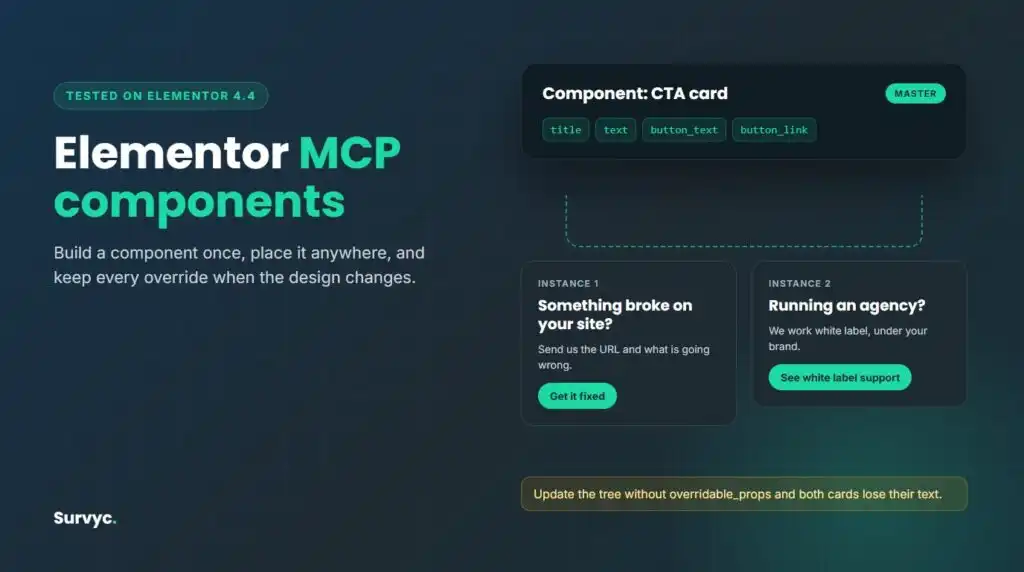
Elementor MCP components let an AI agent create a reusable Elementor component once, choose which fields each copy can change, and place copies with different text and links. On Elementor 4.4 the whole build took me about 3 seconds of tool time. One trap: a full design update drops every override unless you send the overridable props in the same call.
I changed a card's background from dark to green, and both cards on my test page lost their headlines. "Something broke on your site?" and "Running an agency?" turned back into the default "Need a hand with WordPress?". The tool said success, and the component list still showed every override.
I hit this first on Elementor 4.3.3 on 16 October 2026, and again on Elementor 4.4.0 on 18 November 2026. This guide covers the build, the timings, the bug, and the fix that keeps your overrides.
What are Elementor MCP components?
Elementor MCP components are Elementor V4 components that an AI agent creates and places through Elementor's MCP server instead of the editor. A component is a reusable block, such as a call-to-action card, that stays synced everywhere it is used. You pick the fields each copy may change, and Elementor calls those overridable props.
Three MCP tools do the work:
elementor-list-components: lists your components, their override keys, and what your account is allowed to do.
elementor-manage-component: creates, updates, renames, archives, and publishes components.
elementor-build-composition: places copies on a page with an e-component tag and per-copy overrides.
The tool description on Elementor 4.4 says create, rename, and archive need an active Elementor Pro licence, while update and publish also work with an expired one. Elementor's components help page covers the same feature from the editor side. If V4 is new to you, start with what the Elementor Atomic Editor is.
How did I test Elementor MCP components?
I ran every step as an MCP tool call on survyc.com, on a noindex test page, with Elementor 4.4.0 and Elementor Pro 4.2.3. I used the browser only to check the front end. The component was a dark call-to-action card with a heading, a paragraph, and a button, and it exposed 4 overridable props: title, text, button text, and button link.
From creating the component to a published page with two different cards took about 3.2 seconds of tool time. Opening the MCP session added 1.5 seconds. Every number above comes from the test log on survyc.com, 18 November 2026.
 One Elementor MCP component, two copies: each card has its own headline, text, button text, and link. Screenshot of the test page, Elementor 4.4.0.
How do you create a component with Elementor MCP?
You create an Elementor MCP component with one manage-component call that holds the element tree, its styles, and the overridable props. Each prop points at an element by the configuration-id you gave it and names the setting to expose.
"action": "create",
"title": "Survyc CTA card",
"xml_structure": "<e-div-block configuration-id=\"cta-card\"><e-heading configuration-id=\"cta-title\"></e-heading><e-paragraph configuration-id=\"cta-text\"></e-paragraph><e-button configuration-id=\"cta-button\"></e-button></e-div-block>",
"overridable_props": {
"title": { "target": "cta-title", "prop_key": "title", "label": "Card title" },
"text": { "target": "cta-text", "prop_key": "paragraph", "label": "Card text" },
"button_text": { "target": "cta-button", "prop_key": "text", "label": "Button text" },
"button_link": { "target": "cta-button", "prop_key": "link", "label": "Button link" }
}
}
Then place it. Each copy gets the component id and only the overrides that differ from the default. Anything you leave out shows the master value.
"component_id": 2321,
"overrides": {
"title": "Running an agency?",
"button_text": "See white label support",
"button_link": { "destination": "https://survyc.com/for-agencies/white-label-wordpress-support/" }
}
}
Read the override keys back with list-components before you place copies. The keys are the names you chose, so title stays title, which makes the overrides easy to write by hand or in a prompt.
How do you change every instance at once?
Update the component with publish_status set to draft, check it, then publish. In my test the draft changed nothing on the live page. Publishing changed both cards at once: the background went from #1E2A32 to #12A67D and the corner radius from 20px to 28px.
That draft step is the safety net. An agent can stage a design change, you can review it in the editor from the edit link the tool returns, and nothing reaches visitors until someone publishes.
Why did my component overrides disappear?
My overrides disappeared because an update with a full xml_structure rebuilds the component tree with new element ids, while the saved overridable props still point at the old ids. After I published the green design, both copies showed the default headline and button.
 After a full-tree update without overridable props: both copies of the Elementor MCP component fall back to the default text. Elementor 4.4.0.
Three things make this easy to miss:
The update returns success: true, with no warning.
list-components still reports all four override keys, as if nothing changed.
The overrides on each copy are still stored. Only the link between the prop and the element is broken, which is why the fix below brings them back.
I saw the same result on Elementor 4.3.3 in October and on 4.4.0 in November. One thing is new in 4.4: the update response now includes an undo_revision_id.
How do you keep overrides when you update a component?
Send overridable_props in the same update call as the new xml_structure, with the same keys and configuration-ids you used when you created the component. On Elementor 4.4 this brought back the text on both cards, even after the broken update, and applied the new design in the same step.
"action": "update",
"component_id": 2321,
"xml_structure": "...the full tree, same configuration-ids as create...",
"element_config": { "...": "..." },
"style": { "...": "..." },
"overridable_props": {
"title": { "target": "cta-title", "prop_key": "title", "label": "Card title" },
"text": { "target": "cta-text", "prop_key": "paragraph", "label": "Card text" },
"button_text": { "target": "cta-button", "prop_key": "text", "label": "Button text" },
"button_link": { "target": "cta-button", "prop_key": "link", "label": "Button link" }
}
} The highlighted block is the part to resend on every full-tree update. Without it, every copy falls back to the defaults.
 The same Elementor MCP component after an update that resent the overridable props: new design, both copies keep their own text and links.
If the overrides are already broken and you no longer have the original prop map, there is a second repair. Read the component with get-page-structure, then send an update with only overridable_props, using the real element ids as targets. I used that route on Elementor 4.3.3 and it took 0.85 seconds.
Can you turn an existing section into a component?
Yes. Pass source_post_id and element_id instead of xml_structure, and Elementor copies that element into a new component. On Elementor 4.3.3 I copied the agency band from the survyc.com homepage in 0.90 seconds. The homepage itself did not change, and the exposed heading was mapped to the copy's new id. Archiving that test component took 0.55 seconds.
When are Elementor components worth it?
Use an Elementor component when the same block appears on many pages and only its words or links change: call-to-action cards, pricing boxes, team cards, or the repeated sections of location pages. Skip it for a section you use once, because a plain layout is simpler to change.
Check before creating. Elementor's own tool description tells agents to reuse a matching component before making a new one. Without that check you end up with three near-identical cards.
Site styles still leak in. On survyc.com the kit's global link style underlines the button text inside the component, as the screenshots show.
Keep the override map with the build. Because of the bug above, every design update needs the full prop map, so store it in the script or prompt that builds the component.
This is one of the gaps I listed in WordPress AI agents in 2027: the agent got a success message while the page quietly broke. For another timed MCP build, see the cookie banner I built with Elementor MCP, and for the editor-side popup work, how to create a popup with the Atomic Editor. Elementor's MCP setup guide explains how to connect an AI client.
Elementor MCP components work: an agent can create a component with overridable props, place copies with their own text and links, and stage design changes as drafts, all in a few seconds of tool time on Elementor 4.4. The one rule to remember is to resend overridable_props with every full-tree update, because the tool reports success while every copy falls back to its default text.
Frequently asked questions
Do Elementor components need Elementor Pro?
Through the MCP, creating them does. The Elementor 4.4 tool description says create, rename, and archive need an active Elementor Pro licence, while update and publish also work with an expired licence. I tested only with an active Pro licence on survyc.com, so I cannot confirm how an expired licence behaves.
What are overridable props in Elementor components?
Overridable props are the fields of a component that each copy can change, such as the heading, paragraph text, button text, or button link. Everything else stays synced with the master component, so a design change to the master still reaches every page that uses it.
Why do my Elementor component instances show the default text?
Most often because the component was updated with a full element tree and no overridable props. The tree gets new element ids, the saved props still point at the old ones, and every instance falls back to the defaults. Send the overridable props again in the same update call to fix it.
Can an AI agent update an Elementor component without breaking pages?
Yes, if it follows two rules. Stage the change with publish_status set to draft and check it before publishing, and resend the overridable props with every full-tree update. In my test on Elementor 4.4, that kept every instance's text and link while the design changed.
How fast is building a component with Elementor MCP?
In my test on Elementor 4.4, about 3.2 seconds of tool time took me from creating a component with four overridable props to a published page with two different instances. Opening the MCP session added 1.5 seconds. Checking the result in a browser took longer than the build.
Want reusable Elementor components built and maintained for you?
Survyc is an AI-first digital agency. We build Elementor V4 sites with components, test every change on staging, and check the live page before you see it. See our Elementor developer service, or our white label WordPress support if you run an agency. Email us at info@survyc.com or contact a website expert.
