

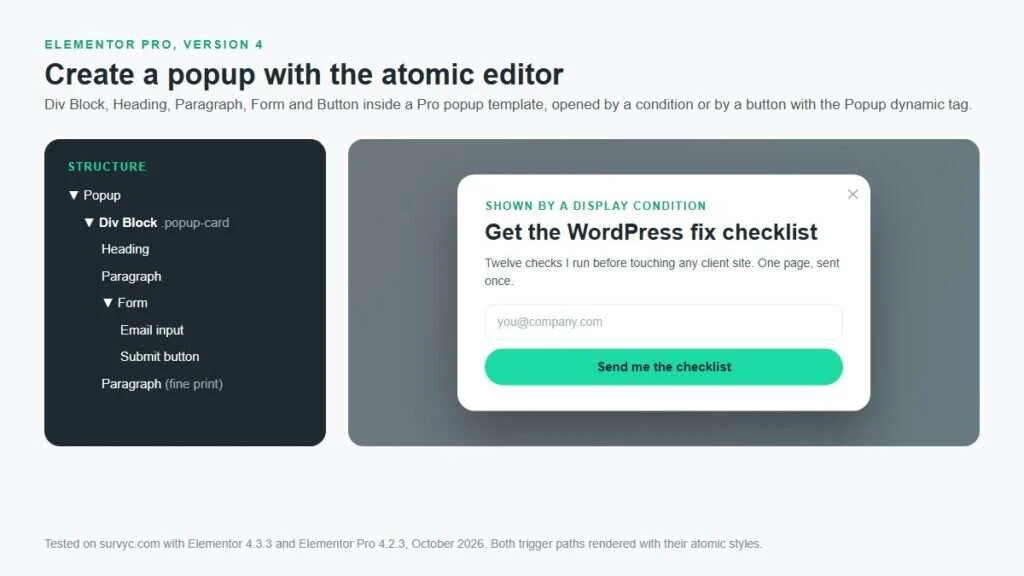
To create a popup with the atomic editor, open Templates, Popups, Add New in Elementor Pro 4, build it from a Div Block holding a Heading, Paragraph, Form and Button, set width and close button in Popup Settings, publish with a condition and a trigger, and open it from any V4 button with the Popup dynamic tag.
I built two popups on survyc.com this week to answer one question: do Elementor V4 atomic elements keep their styling inside a popup? A bug report on Elementor’s GitHub says popups opened by a click lose their saved atomic CSS. On Elementor 4.3.3 with Elementor Pro 4.2.3, both of my popups rendered exactly as designed, on desktop and on a phone.
They only did that after I stopped doing one thing wrong, and that mistake is the reason this guide exists. The build itself takes about fifteen minutes. The part that catches people is how you open the popup, so I have given it its own section.
What you need before you startWhat changes when you create a popup with the atomic editor
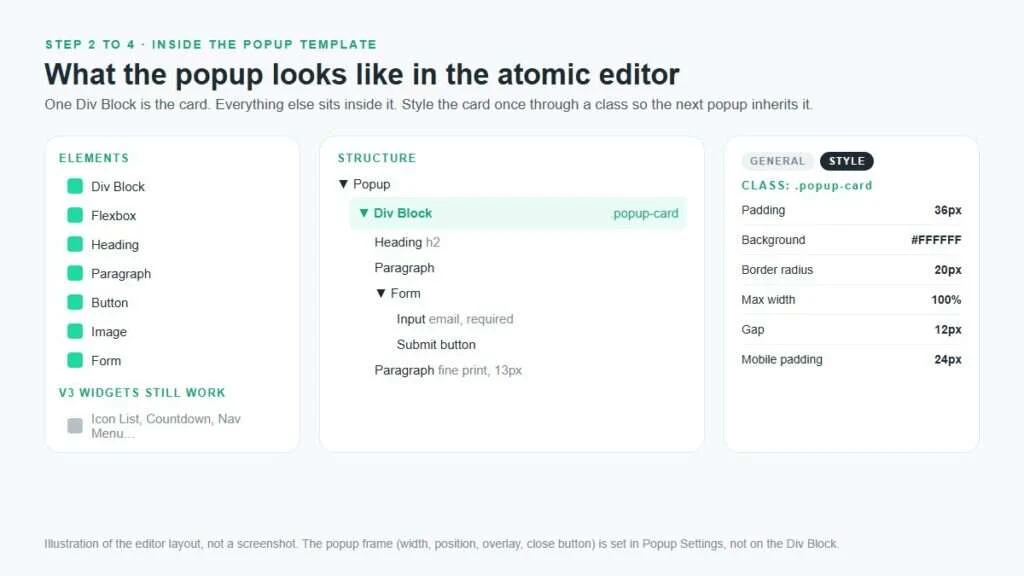
When you create a popup with the atomic editor, the popup is still an Elementor Pro Theme Builder document. Its frame, its display conditions, its triggers and its advanced rules are the same screens they were in version 3. What changes is everything inside the frame: you build the content from atomic elements, Div Block, Flexbox, Heading, Paragraph, Button, Image and Form, and you style them through the Style tab, classes and variables rather than through widget-specific controls.
That split matters in practice. The popup’s width, position, overlay, close button and entrance animation live in Popup Settings, the cog icon at the bottom of the panel. The card inside the popup, its padding, background, radius and typography, lives on your Div Block. New users put padding on the popup frame and wonder why the mobile version looks wrong. Put it on the Div Block.
A handful of version 3 widgets have no atomic equivalent yet (as of October 2026): Icon List, Countdown, Nav Menu and a few others. You can still drop the V3 widget into an atomic popup. It works, it just carries its own CSS and does not pick up your classes. Elementor’s version 4 FAQ tracks which widgets have moved.
How do I build the popup in the atomic editor?
Six steps, in the order I do them. The first four happen in the editor, the last two in Popup Settings and the publish dialog. For a plain WordPress route without Elementor, my guide to creating a popup in WordPress covers the plugin options.
Create the popup template
In the WordPress admin go to Templates, then Popups, then Add New. Name it for the offer, not the design (“Checklist popup”, not “Popup 2”), because the name is what you will pick from a list later. The editor opens with an empty popup frame in the centre of a dimmed canvas.
Add one Div Block as the card
Drag a Div Block into the frame. This single block is your card. In the Style tab give it padding of 36px, a white background, a 20px radius and a 12px gap, then switch to the mobile breakpoint and drop the padding to 24px. Save those styles as a class called popup-card. The next popup you build inherits the whole look in one click.
Add the heading, text, form and fine print
Inside the Div Block add a Heading set to h2, a Paragraph, a Form and a second Paragraph for the fine print. Keep the Form to one field, email, and one submit button. Every extra field I have tested on a popup cut submissions, and the name can be asked for later.
Button: Submit
Paragraph: Twelve checks I run before touching any client site. One page, sent once.
Button: Send me the checklist
Style through classes, not element by element
Set the heading and button styles as classes too (popup-title, popup-button). A class is defined once and reused, so when the client wants the button a shade darker you change it in one place and every popup and page that uses the class follows. Element-level styling works, but it turns the third popup into a copy-and-check job.
Set the frame in Popup Settings
Open Popup Settings from the cog icon. I use a width of 520px on desktop, “fit to screen” off, position centre, the overlay on, the close button on, the fadeInUp entrance at 0.6 seconds and “prevent scroll” on for desktop only. On mobile, let the width follow the screen with 16px of margin, or the close button ends up off-screen on small phones.
Publish with a condition, a trigger and advanced rules
Click Publish. Three screens follow. Conditions decide where the popup can appear: start with one landing page, not the whole site. Triggers decide when: On Page Load with a two-second delay is the gentlest start, On Scroll at 50% suits long guides, Exit Intent is desktop only. Advanced Rules stop the popup from becoming a nuisance: show after two page views, show once per session, avoid multiple popups.
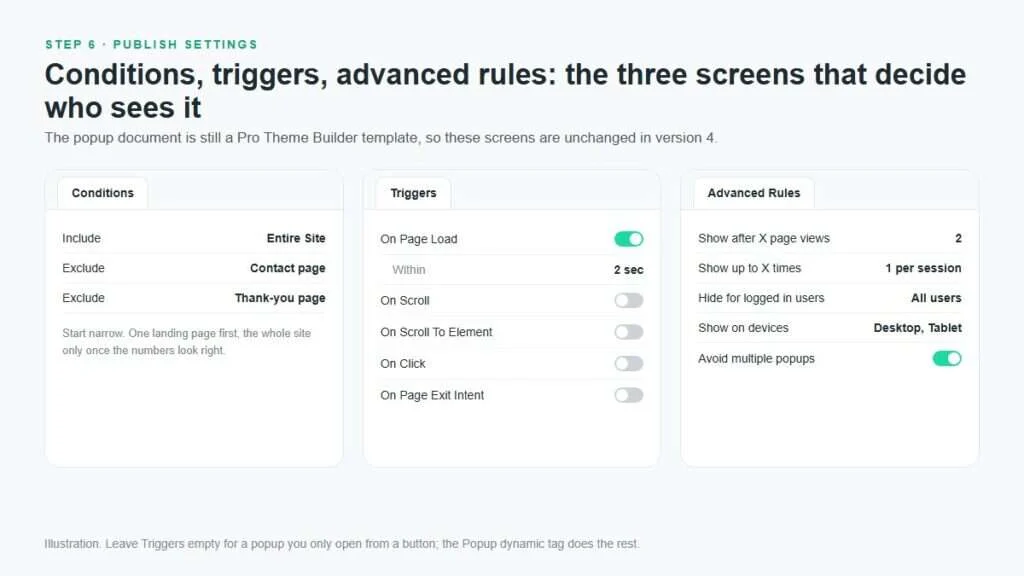
Elementor’s own popup builder documentation lists every trigger and rule. The settings above are the ones I actually ship.
How do I open an atomic popup from a button?
Open an atomic popup from a button by setting the button’s Link to a dynamic tag: click the dynamic icon next to the link field, choose Popup, set Action to Open and pick the popup by name. Do not paste an #elementor-action URL into the link field, which is what version 3 tutorials still show. On my test page that pasted link did nothing at all.
The reason is worth knowing. When a page renders, Elementor Pro scans its elements for popup references so it can print the popup in the footer and load the popup’s CSS in the head. Pro 4.2.3 looks for the Popup dynamic tag and for the Form “open popup” action. A hand-typed URL is just a string, so Pro never registers the popup for that page, the button highlights, and nothing opens.
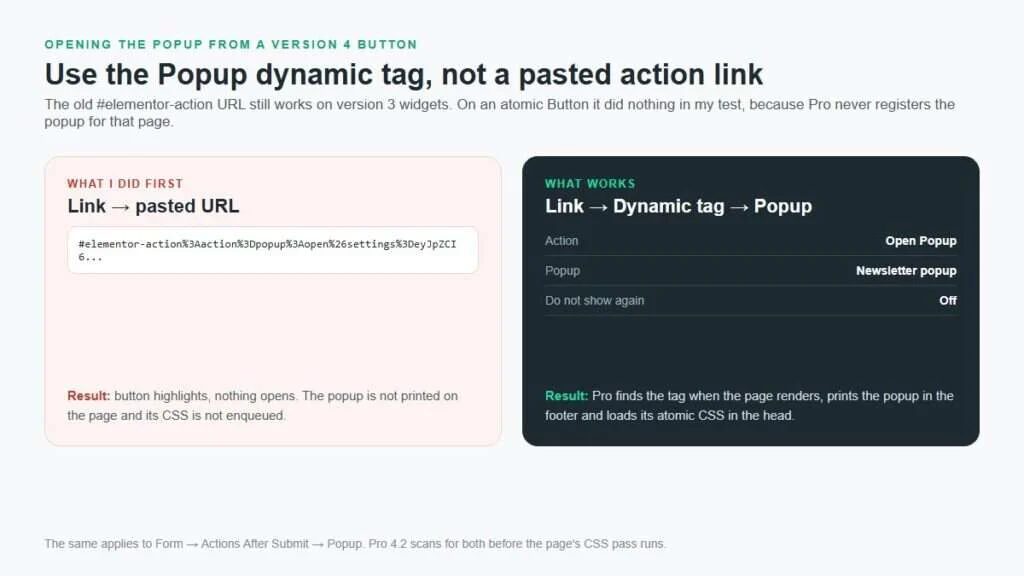
The same tag works on an Image element and on text links inside a Paragraph. Forms have their own version: under Actions After Submit add Popup, then choose Open or Close and the target popup. That is how I close a popup after a successful submission and open a thank-you popup in its place. The same close action with “Do not show again” is how I built a cookie banner with Elementor MCP in a few seconds of tool time.
Does the V4 CSS actually load inside the popup?
Yes, on current versions, for both ways of opening it. The GitHub report describes popups opened by a click or a form action rendering with their markup but without their atomic styles, because the popup was queued after the page’s one-time CSS pass had finished. The Elementor Pro build I tested, 4.2.3, carries a fix that registers those popups during the render pass instead, and my results matched it.
The test: two identical popups built from atomic elements. Popup B is printed on the page by a display condition. Popup A is not on the page until a V4 button with the Popup dynamic tag asks for it. I loaded the page in a desktop browser and on a phone-sized viewport, opened each popup, and read the computed styles of the heading and the button.
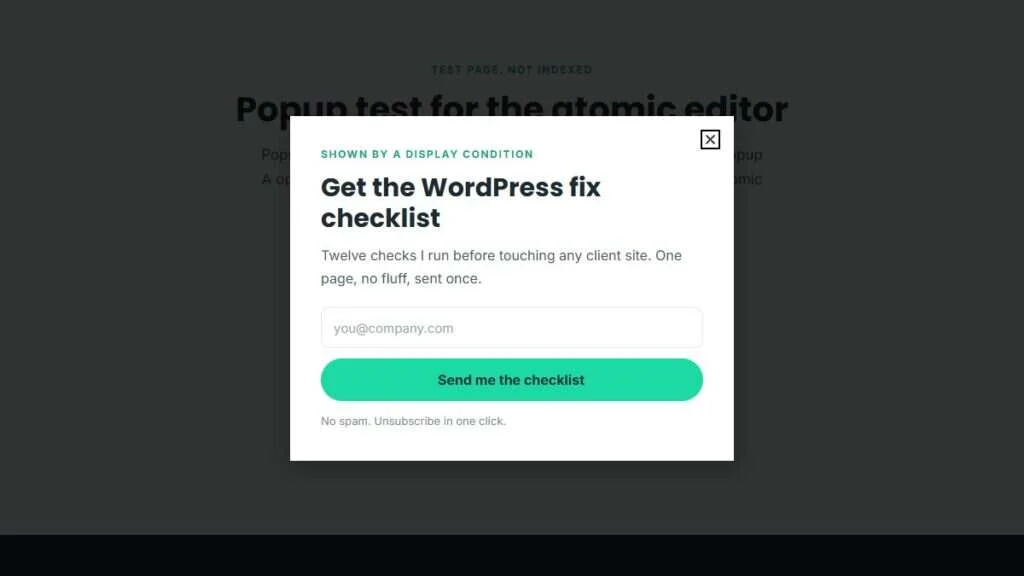
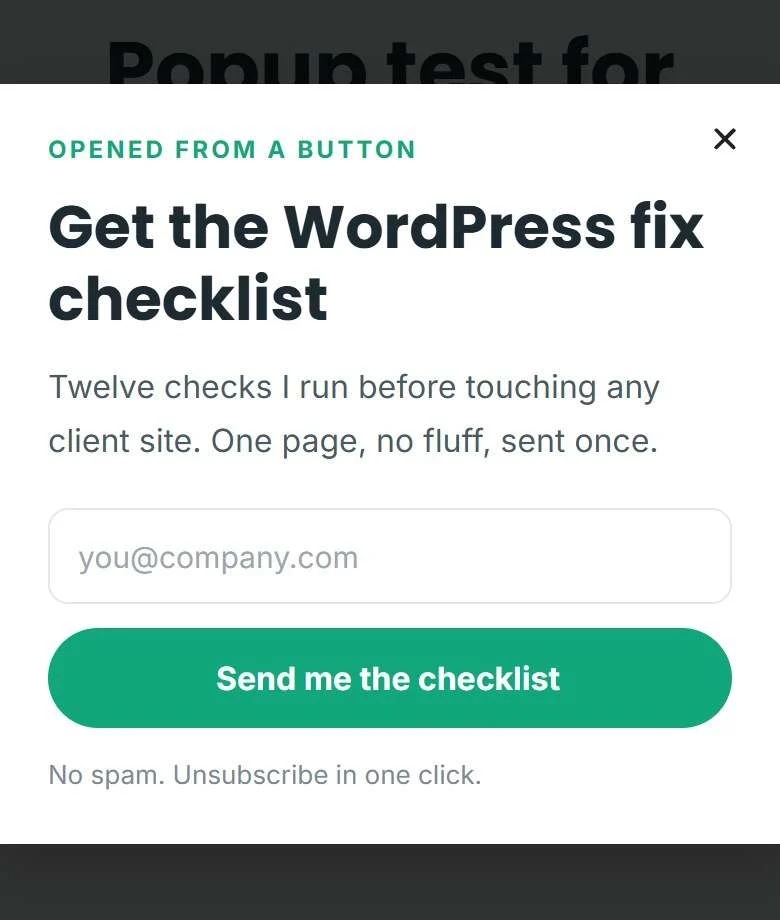
Check three things in this order. First, that Elementor Pro is 4.2.3 or later and the editor cache has been cleared under Elementor, Tools, Regenerate CSS & Data. Second, that the button uses the Popup dynamic tag rather than a pasted URL. Third, that the popup is not being opened by custom JavaScript or a third-party plugin, which the fix cannot see. If it is, give the popup a display condition for that page so it is printed with the page, and leave Triggers empty.
How do you make an atomic editor popup engaging rather than annoying?
An engaging popup is a specific offer shown to the right person at a moment they can act on it, once. Everything else is a reflex click on the close button. These are the rules I apply before a client popup goes live.
One ask, one field. The headline names what they get; the button names the action.
Delay or depth, not both. Two seconds on a landing page, or 50% scroll on a long guide.
Once per session, after the second page view. Advanced Rules make this a two-minute setting.
Exit intent on desktop only. Phones have no cursor to leave with, and the trigger misfires.
Mobile width follows the screen, close button inside the card, “prevent scroll” off so the page behind does not jump.
No autoplay video, no images over about 150 KB. The popup loads with the page, so it costs every visitor something.
Read Submissions weekly. A popup that converts under one percent after two hundred views needs a new offer, not a new colour.
Two related fixes come up on almost every popup build. If the form behind the popup starts attracting junk, my guide to stopping contact form spam in WordPress covers the honeypot and challenge settings that apply to Elementor forms. If the popup slows the page, start with the seven Elementor speed fixes rather than removing the popup.
When is a popup the wrong tool?
A popup is the wrong tool when the offer belongs in the page. A pricing question, a quote request and a booking all convert better inline, where the visitor already is, than in a layer that interrupts them. Save popups for the thing a visitor would not scroll to find: a checklist, a discount at exit, a notice that applies to everyone.
Two more cases. If the site already shows a cookie banner and a chat bubble, a third layer on page load is one too many; use a scroll trigger or a button instead. And if the popup has to appear in the first second to “work”, the page above it is the problem. Start with why the page is not producing enquiries and fix that first.
Key takeaways
To create a popup with the atomic editor, build the content from a Div Block, Heading, Paragraph, Form and Button inside a Pro popup template, style through classes, set the frame in Popup Settings, and publish with a condition, a trigger and advanced rules.
Open the popup from a V4 button with the Popup dynamic tag. A pasted #elementor-action URL did nothing on an atomic button in my test, because Pro never registers the popup for the page.
On Elementor 4.3.3 with Pro 4.2.3 both trigger paths rendered the atomic CSS correctly. If yours does not, update Pro, regenerate CSS and data, and check how the popup is being opened.
One ask, one field, once per session, after the second page view. Measure in Submissions and change the offer before you change the design.
Frequently asked questions
Can I use V4 atomic elements inside an Elementor popup?
Yes. The popup template opens in the same editor as your pages, so Div Block, Flexbox, Heading, Paragraph, Button, Image and Form all work inside it, with classes and variables. The popup frame itself, its width, overlay and close button, is still set in Popup Settings. Older V3 widgets can be mixed in where no atomic version exists yet.
Why does my atomic editor popup lose its styling when it opens?
Usually because the popup was opened in a way Elementor Pro could not detect when the page rendered, so its atomic CSS was never loaded. Update Elementor Pro to 4.2.3 or later, regenerate CSS and data, and open the popup with the Popup dynamic tag or a form action rather than a pasted URL or custom JavaScript.
How do I create a popup with the atomic editor that opens from a button?
Build the popup under Templates, Popups, publish it without triggers, then on your button set Link to a dynamic tag, choose Popup, set Action to Open and select the popup by name. Do the same on an image or text link. For a form, use Actions After Submit, then Popup, to open or close one.
Can I trigger a popup on scroll or exit intent in Elementor version 4?
Yes. Triggers are part of the Pro popup document and have not changed in version 4: On Page Load, On Scroll, On Scroll To Element, On Click, After Inactivity and On Page Exit Intent. Set them in the publish dialog. Exit intent relies on cursor movement, so I switch it off for mobile under Advanced Rules.
Do popups built in the atomic editor slow the site down?
Less than V3 popups did, because atomic elements ship smaller CSS and no widget scripts, but the popup still loads with every page its condition covers. Keep images small, avoid autoplay video, scope the condition to the pages that need it, and the cost stays within a few kilobytes.
How do I show a popup only once per visitor?
In the publish dialog open Advanced Rules and set Show up to X times to 1, per session or per a number of days. Pair it with Show after X page views set to 2 so first-time visitors read something before they are asked. Both rules live in the browser, so clearing cookies resets them.
Want the popup built, or an Elementor site that stops fighting you?
Survyc is an AI-first digital agency, and Elementor work is a daily part of what we do: builds, version 4 migrations, fixes when Elementor stops working, and the small jobs like a popup that needs to convert. We work directly with businesses and white label for agencies, hourly or at a fixed price confirmed before we start. Tell us what the popup needs to do or email info@survyc.com.
Talk to us about your Elementor siteLast reviewed: October 2026, on Elementor 4.3.3 and Elementor Pro 4.2.3. Version 4 changes quickly, so this guide is re-tested every quarter.
